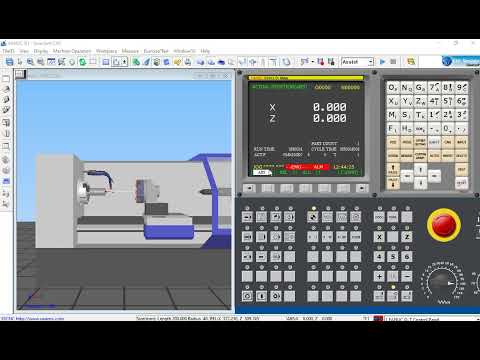
If you are looking to master the art of precision engineering without the risk of damaging expensive machinery, Nanjing Swansoft is the industry standard for virtual training. Whether you are a student or a professional machinist, having a reliable platform to test your code is essential. In this guide, we will walk you through the process of setting up this powerful CNC simulator software to ensure a smooth and safe learning experience.
Why Nanjing Swansoft is Essential for Beginners
Before stepping onto the factory floor, every aspiring machinist needs a safe environment to practice G-code and M-code programming. Nanjing Swansoft provides a highly realistic 3D interface that mimics real-world machines from brands like Fanuc, Siemens, and Mitsubishi.
By using high-quality CNC simulator software, you can identify errors in your code, prevent tool collisions, and understand machine kinematics in a risk-free digital space. This not only builds confidence but also saves significant costs associated with material waste and tool breakage.
How to Install the Simulator Safely
Installing the software is a straightforward process, but following the correct steps is vital to ensure all libraries and machine profiles load correctly. Follow these steps for a successful setup:
- Download the Package: Ensure you are obtaining the Nanjing Swansoft installation files from a trusted source or the official website to avoid security risks.
- Run the Setup Executable: Open the installer and follow the on-screen instructions. It is recommended to install the software on a drive with at least 1GB of free space.
- Configure Machine Profiles: During the initial setup, you will be prompted to select specific controller types. Choose the profiles that align with your current curriculum or workplace standards.
- System Compatibility: If you are using a modern version of Windows, ensure you run the application as an administrator to grant the software the necessary permissions for 3D rendering.
Getting Started with Your First Simulation
Once the installation is complete, take a moment to explore the user interface. The beauty of modern CNC simulator software lies in its ability to toggle between the virtual control panel and the 3D view of the machine workpiece. We recommend starting by loading a simple sample program to observe how the virtual machine handles tool changes and rapid movements.
Conclusion
Nanjing Swansoft is more than just a training tool; it is a bridge between theoretical knowledge and practical application. By following this installation guide, you are taking the first step toward becoming a proficient CNC programmer. Take your time to explore the various controllers, and soon you will be ready to translate your virtual successes into real-world precision.

No comments:
Post a Comment