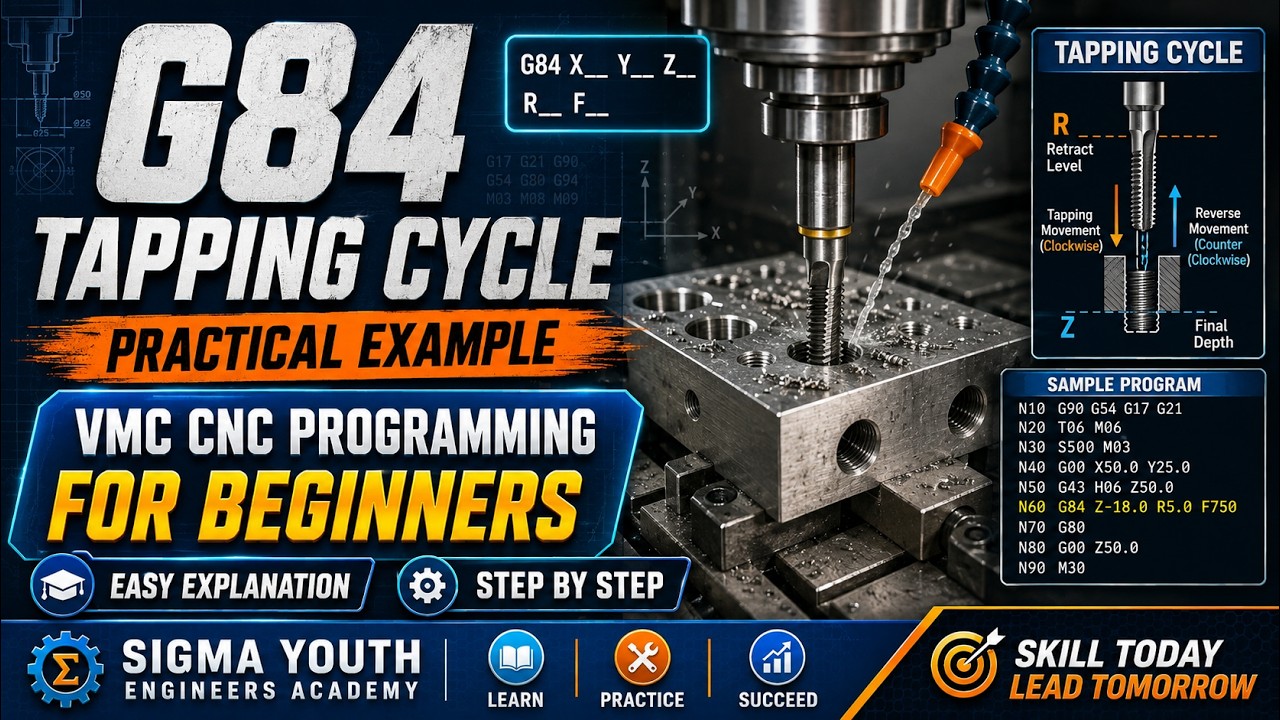
Mastering the G84 Tapping Cycle in VMC: A Beginner’s Guide to CAD/CAM Workflows
This article provides an in-depth exploration of CAD/CAM, covering foundational concepts, practical applications, and engineering insights.
Thread cutting on a Vertical Machining Center (VMC) can seem intimidating for beginners, but leveraging built-in canned cycles makes the process efficient and reliable. Among these commands, the G84 tapping cycle is the industry standard for machining right-hand threads quickly and accurately. Whether you write code manually at the machine control or generate toolpaths using modern CAD/CAM software, understanding how the G84 cycle operates is essential for every machinist.
What is the G84 Tapping Cycle?
The G84 code initiates a canned cycle specifically designed for tapping operations. When executed, the VMC precisely synchronizes spindle rotation with Z-axis axial feed. The tap feeds into a pre-drilled hole until reaching the programmed Z-depth. Upon reaching the bottom, the spindle automatically stops, reverses direction, and retracts at the same synchronized feed rate to prevent thread damage.
Key Parameters in a G84 Command Line
A standard G84 block in a CNC program typically includes the following structure:
G84 X_ Y_ Z_ R_ F_
- X, Y: Target hole coordinates.
- Z: Final thread depth plane.
- R: Clearance plane position where rapid positioning stops and tapping feed begins.
- F: Feed rate, calculated precisely based on spindle speed (RPM) and thread pitch.
Calculating the correct relationship between feed rate and spindle speed is critical to avoid tap breakage, especially when rigid tapping without a floating tap holder.
Combining Manual G-Code Knowledge with CAD/CAM Software
While understanding manual code structure helps operators debug programs on the shop floor, modern CAD/CAM systems streamline this process by automatically generating optimized tapping toolpaths. Advanced post-processors translate hole features directly into clean G84 cycles, ensuring accurate pitch calculations and clearance heights without manual entry errors.
By combining a solid foundation in manual G-code parameters with powerful CAD/CAM software, programmers and operators can significantly reduce setup times, avoid costly crashes, and achieve precise internal threads on every component.

No comments:
Post a Comment