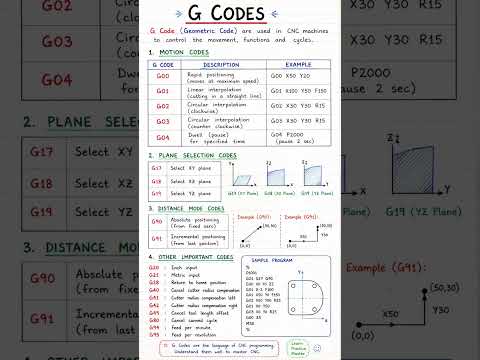
Computer Numerical Control (CNC) machining relies on a specialized language to direct cutting tools with exact precision. Whether you program your machine manually or rely on a modern G-code generator to create your toolpaths automatically, understanding the fundamental commands is essential for every machinist and engineering student.
In this beginner-friendly guide, we will break down the core G-codes that control tool movements and positioning.
Essential Motion Commands: G00 to G03
The most common commands in CNC programming dictate how the cutting tool moves across the workpiece.
- G00 (Rapid Positioning): This code moves the machine head to a specified coordinate at maximum speed. It is used strictly for non-cutting repositioning to save production time.
- G01 (Linear Interpolation): Unlike G00, G01 moves the tool in a straight line at a controlled feed rate to cut material precisely.
- G02 (Circular Interpolation Clockwise): Used when the tool needs to cut an arc or a circle in a clockwise direction.
- G03 (Circular Interpolation Counter-Clockwise): Similar to G02, but moves the tool in a counter-clockwise direction to generate smooth curved paths.
Positioning Systems: G90 vs. G91
Before sending motion commands, the machine needs to know how to interpret coordinate points. This is where positioning modes come into play:
- G90 (Absolute Positioning): Under G90, all X, Y, and Z coordinates are referenced from a single fixed origin point (Work Coordinate System zero).
- G91 (Incremental Positioning): Under G91, coordinates are measured relative to the tool’s current position. Moving to
X10will advance the tool 10 units from where it is currently standing.
Why You Still Need Manual Code Knowledge
Advanced CAM software and any reliable G-code generator can output thousands of lines of code in seconds. However, automated systems are not foolproof.
Knowing how codes like G01, G02, G90, and G91 work allows you to inspect program headers, perform quick edits directly at the machine controller, and troubleshoot errors safely before hitting the cycle start button.
Whether your programs are written by hand or created with an intuitive G-code generator, mastering these core commands ensures efficient machining, fewer tool collisions, and higher part accuracy on the shop floor.

No comments:
Post a Comment