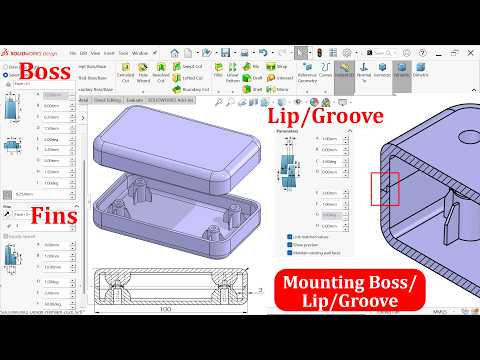
Designing plastic enclosures and multi-part assemblies requires precise alignment and secure joining methods. In modern CAD/CAM workflows, utilizing automated fastening features can save hours of manual modeling while ensuring your parts fit together seamlessly during assembly and manufacturing. SolidWorks provides built-in toolsets specifically engineered to streamline the creation of mounting bosses and lip-groove joints.
What Are Mounting Bosses and How to Model Them
Mounting bosses are cylindrical projections used to accept screws, threaded inserts, or alignment pins in plastic parts. Instead of manually sketching, extruding, and filleting multiple features, SolidWorks provides a dedicated Fastening Feature tool for Mounting Bosses.
When configuring a mounting boss, keep these design considerations in mind: * Draft Angles: Incorporate proper draft angles to allow clean part ejection during injection molding. * Wall Thickness: Maintain uniform thickness relative to the main wall to prevent sink marks on aesthetic surfaces. * Gussets: Add supporting ribs to increase mechanical strength without adding excessive material.
Mastering these built-in tools is an essential skill for CAD/CAM engineers who want to create production-ready components efficiently.
Perfecting Part Mating with the Lip and Groove Feature
When joining two halves of an enclosure, relying on flat mating surfaces often leads to misalignment, dust leakage, or structural weakness. The Lip and Groove fastening feature automatically generates interlocking geometry along the parting line of matching bodies.
Key benefits of using the Lip and Groove feature include: * Automatic Alignment: Prevents lateral movement between top and bottom housing covers. * Improved Sealing: Creates a tortuous path that helps seal out dust and moisture. * Parametric Flexibility: Easily adjust lip height, clearance, and draft angles across both mating parts simultaneously.
Streamlining Design for Manufacturing
Integrating automated fastening features into your workflow does more than just speed up modeling time—it bridges the gap between digital concepts and physical production. By leveraging these parametric tools, you maintain clean feature trees, minimize downstream edits, and elevate your overall CAD/CAM product design standards. Whether you are developing consumer electronics or industrial plastic enclosures, mastering mounting bosses and lip-grooves ensures reliable, high-quality manufacturing results.

No comments:
Post a Comment