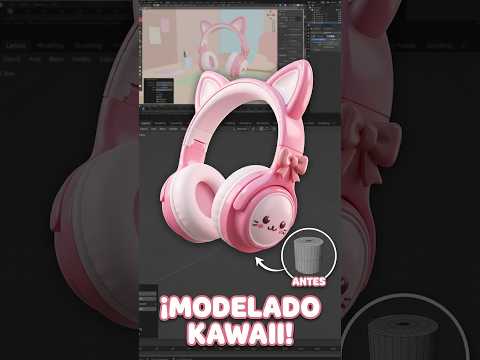
Looking to dive into the world of cute digital art? Whether you are a beginner artist or an experienced creator, learning 3D modeling in Blender opens up endless creative possibilities. Today, we are focusing on a super fun and charming project: speed modeling adorable kawaii-style headphones!
Why Choose Blender for Cute 3D Assets?
Blender is a powerful, free, open-source software that has revolutionized the graphics industry. Its robust set of tools allows creators to turn simple geometric shapes into stunning visual art.
When it comes to aesthetic and kawaii designs, Blender’s intuitive mesh editing, modifier stacks, and real-time viewport rendering make the entire process smooth and enjoyable. Speed modeling this type of accessory is a fantastic way to practice your workflow without getting overwhelmed by overly complex technical details.
Key Steps to Model Kawaii Headphones
Creating a cute pair of headphones relies on mastering basic proportions and soft curves. Here is a quick breakdown of how to approach this project:
- Base Mesh Blocking: Start with simple primitives like cylinders and toruses to form the earcups and the headband.
- Adding Aesthetic Details: Kawaii designs thrive on charm! Add tiny cat ears, soft ear cushions, and sleek accents using subdivision surface modifiers.
- Coloring and Shading: Choose a vibrant pastel palette—such as soft pinks, whites, and mint greens—to give your model that iconic cute aesthetic.
By mastering these simple techniques, you can elevate your overall 3D modeling skills while building an eye-catching portfolio of aesthetic assets.
Tips to Improve Your Speed Modeling Workflow
Speed modeling isn't just about moving fast; it’s about working smart. To speed up your 3D modeling process in Blender, make heavy use of essential keyboard shortcuts like extruding (E), scaling (S), and inserting loop cuts (Ctrl + R). Always keep reference images handy to guide your proportions, and rely on non-destructive modifiers like Mirror and Bevel to save precious time.
Ready to Start Creating?
Transforming a blank viewport into a finished, adorable 3D asset is incredibly rewarding. Practice these steps, experiment with your own cute ideas, and sharpen your digital artistry! For the complete step-by-step video process, check out the full tutorial on the channel and follow along on social media for more quick tips and tricks.

No comments:
Post a Comment